1. Overview
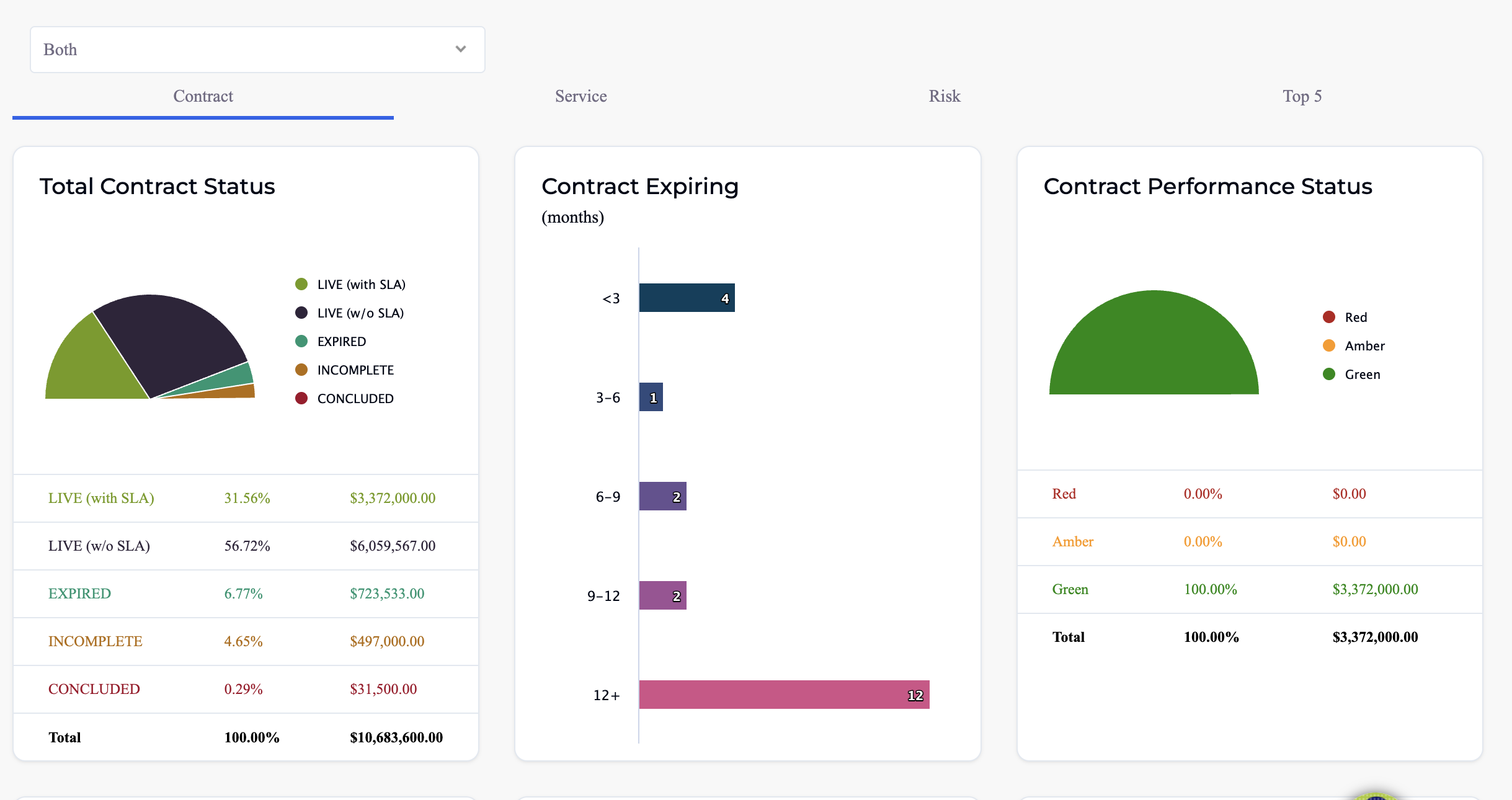
The Dashboard is the first screen users see after logging in. It provides an at-a-glance visual summary of the entire contract portfolio — contract counts by status, RAG health distribution, upcoming expiries, financial summaries, and key performance metrics.
The Dashboard has two main views:
- Main Dashboard (DB1) — covers all contracts across the organisation with status breakdowns, RAG distribution, expiry timelines, and financial summaries.
- Contract Builder Dashboard (DB2) — a focused view showing only contracts created via the Contract Builder (template-based), with their signature status and document tracking.
Additional tabs provide deeper analysis: Service (service-level performance), Risk (contracts at risk by RAG and expiry), and Top 5 (top services, suppliers, SLAs, and consumption by various metrics).
2. Main Dashboard
2.1 Row 1 — Contract Overview
The first row shows contract counts by status (Active, Expired, Draft, etc.), RAG health distribution (Green/Amber/Red), upcoming expiry dates, and total contract value. This gives an immediate picture of portfolio health.
2.2 Row 2 — Contract Builder Contracts
| Widget | Chart Type | Description |
|---|---|---|
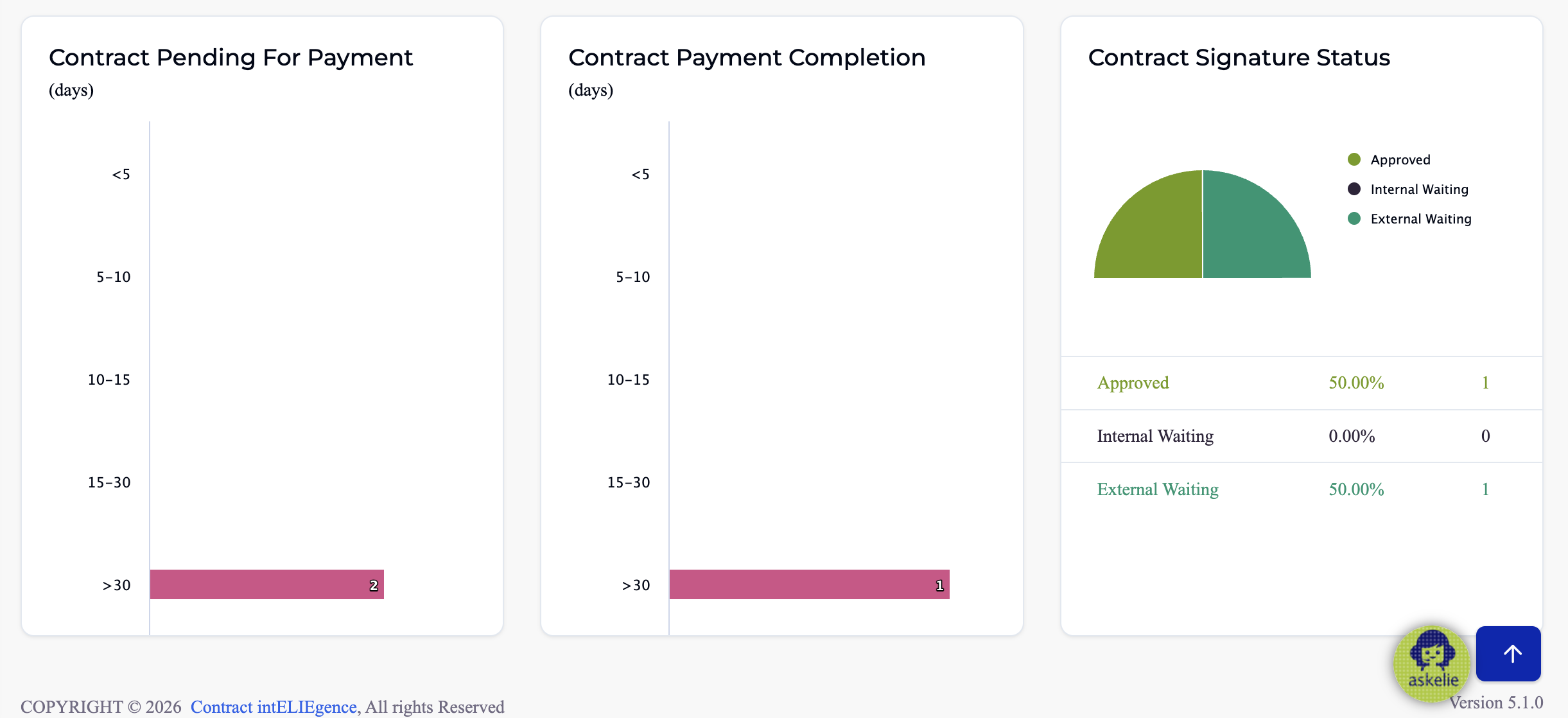
| Contract Pending For Payment | Bar chart | Contracts grouped by number of days pending payment: <5, 5–10, 10–15, 15–30, >30 days. |
| Contract Payment Completion | Bar chart | Contracts grouped by number of days to payment completion (same day ranges as above). |
| Contract Signature Status | Pie chart | Signature status breakdown — Approved, Internal Waiting, External Waiting — with percentage and count. |
3. Service Tab
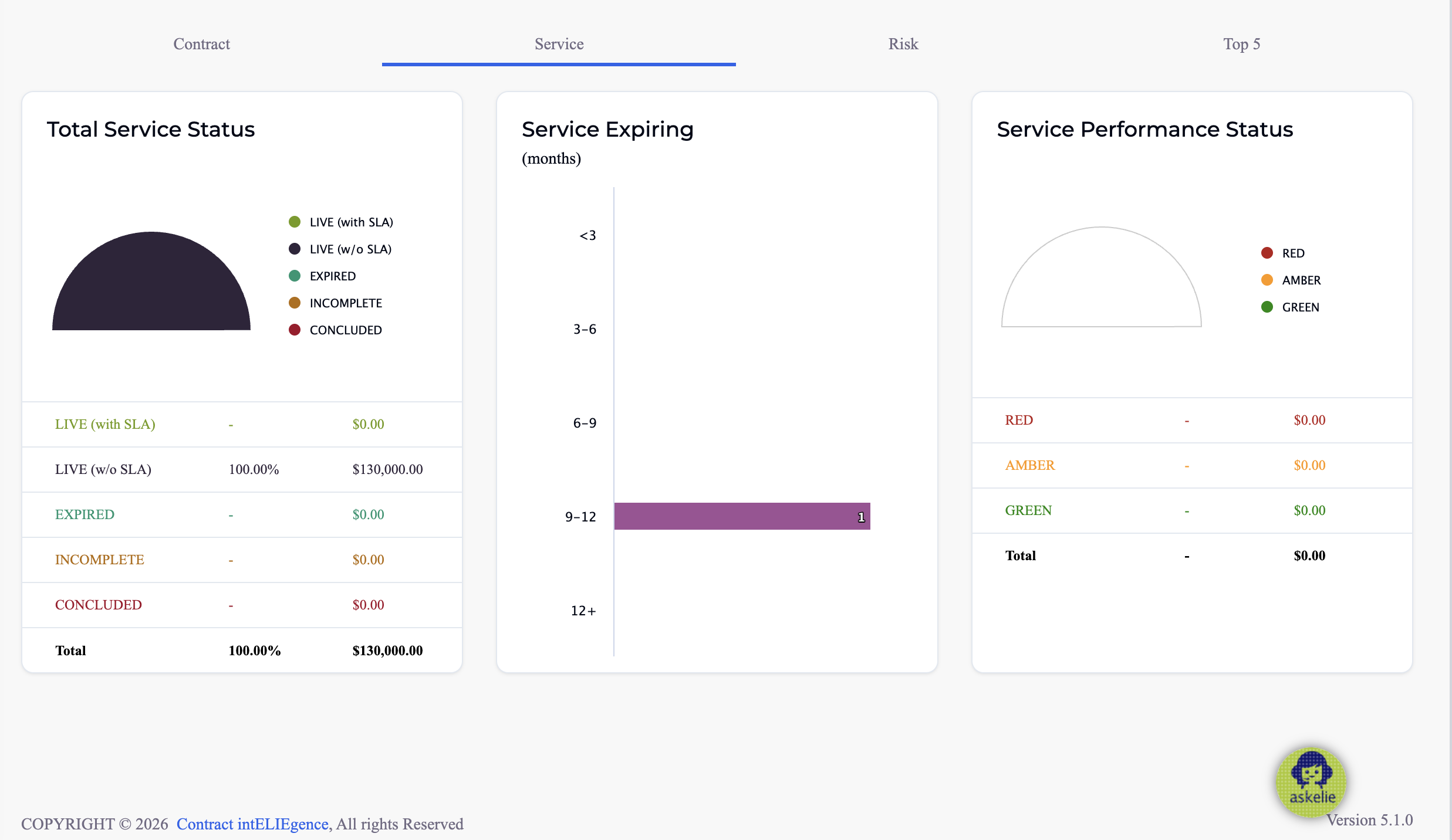
The Service tab provides the same analytical lens applied to Service Manager records rather than contracts. It contains three widgets:
| Widget | Chart Type | Description |
|---|---|---|
| Total Service Status | Pie chart | Distribution of service records by status (same status categories as contracts: Live with SLA, Live w/o SLA, Expired, Incomplete, Concluded). |
| Service Expiring | Bar chart | Services expiring by month range (<3, 3–6, 6–9, 9–12, 12+ months). |
| Service Performance Status | Gauge chart | RAG distribution — Red / Amber / Green — shown as a gauge with percentage and dollar value. |
4. Risk Tab
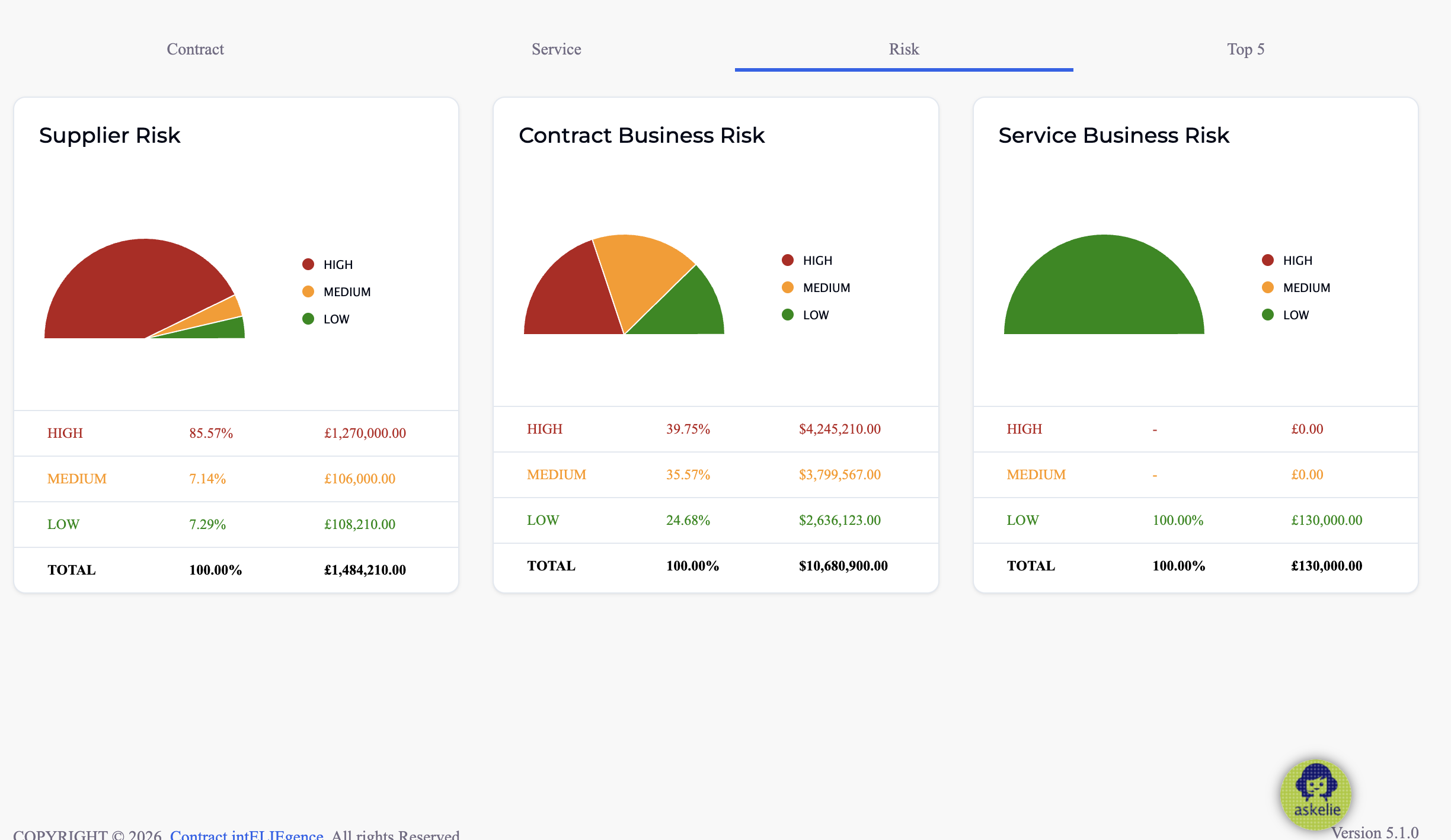
The Risk tab surfaces risk distribution across suppliers, contracts, and services to support proactive risk management.
| Widget | Chart Type | Description |
|---|---|---|
| Supplier Risk | Pie chart | Distribution of suppliers by risk level — High, Medium, Low — with percentage and total spend per risk category. |
| Contract Business Risk | Pie chart | Distribution of contracts by business risk level — High, Medium, Low — with percentage and dollar value. |
| Service Business Risk | Pie chart | Distribution of services by business risk level — High, Medium, Low — with percentage and value. |
5. Top 5 Tab
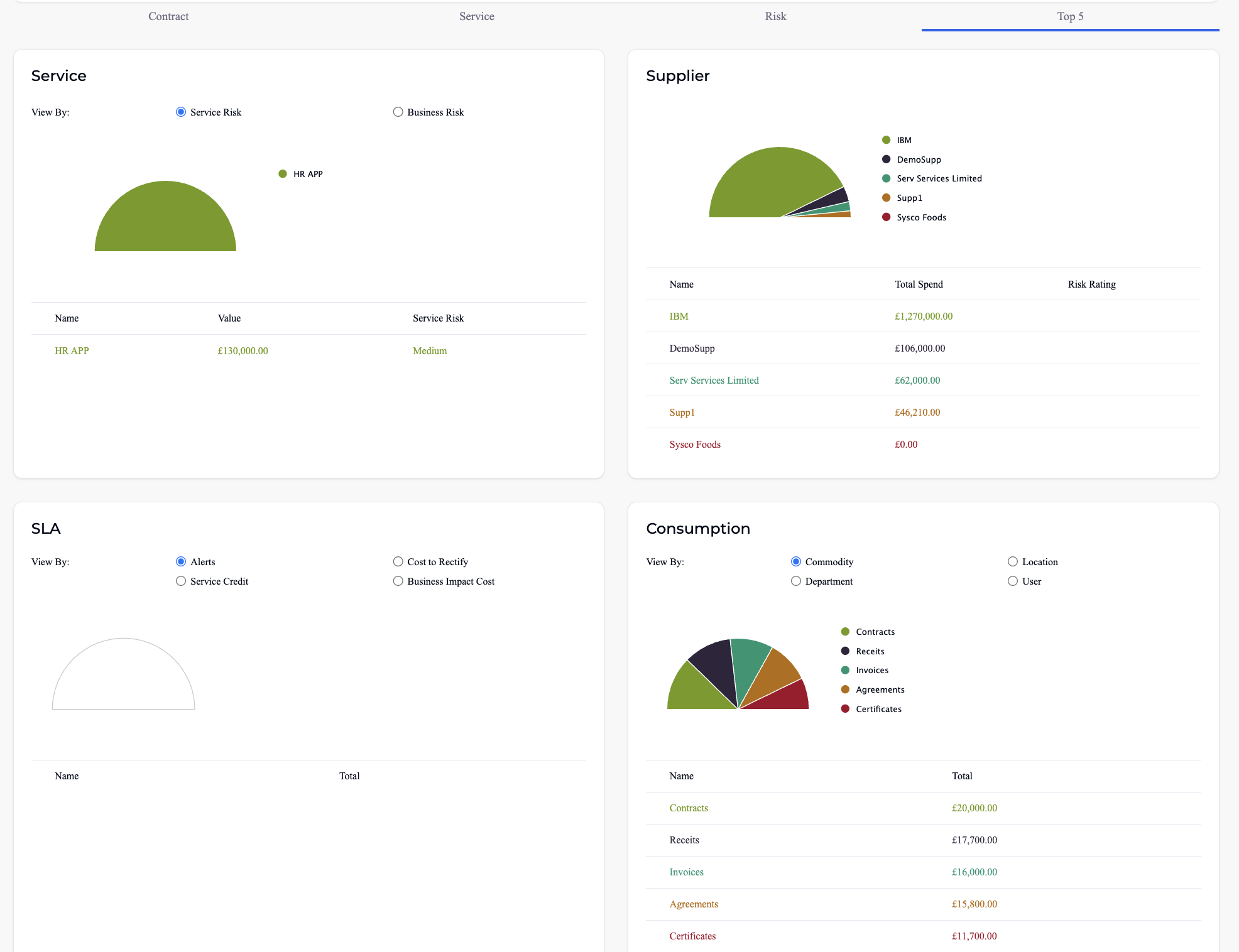
The Top 5 tab highlights the biggest cost drivers and risk concentrations across four dimensions. Each widget includes a chart and an accompanying data table.
5.1 Service
- Chart: Pie chart showing the top 5 services by risk.
- Radio toggle: Switch between Service Risk and Business Risk views.
- Table columns: Name, Value, Risk.
5.2 Supplier
- Chart: Pie chart showing top 5 suppliers by spend.
- Table columns: Name, Total Spend, Risk Rating.
5.3 SLA
- Chart: Gauge chart showing top SLA breach costs.
- View By radio: Alerts, Service Credit, Cost to Rectify, Business Impact Cost — each view surfaces the top SLA breach costs for the selected dimension.
5.4 Consumption
- Chart: Pie chart showing cost breakdown by selected dimension.
- View By radio: Commodity, Location, Department, User.
- Table columns: Name, Total.
6. Tips
- Use the Buy / Sell / Both dropdown at the top of the dashboard to focus on a specific contract type or view combined metrics.
- Contract tab Row 2 (Payment Pending, Payment Completion, Signature Status) applies only to contracts created via Contract Builder with e-signature — other contract types will not appear in those charts.
- The Risk tab helps identify high-risk suppliers and contracts early so you can take proactive management action before issues escalate.
- The Top 5 tab surfaces the biggest cost drivers and risk concentrations — use the radio toggles to drill into different dimensions (risk type, SLA cost category, consumption breakdown).